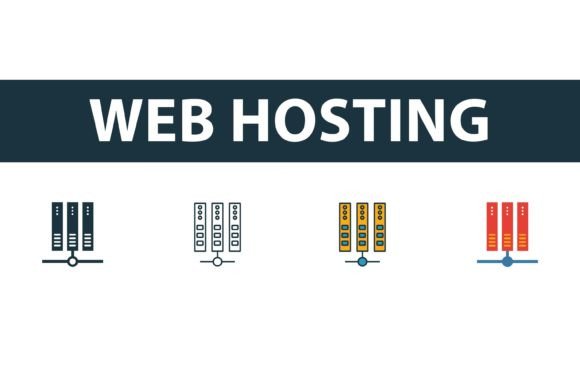
Web Hosting Icon Set: Essential Vector Graphics
In the digital landscape, visual communication often speaks louder than text. A Web Hosting Icon Set is more than just a collection of decorative images; it is a fundamental toolkit for designers, developers, and content creators who need to convey complex technical concepts quickly and clearly. Whether you are building a landing page for a new server provider, designing an infographic about cloud storage, or creating a presentation for stakeholders, the right icons can bridge the gap between technical jargon and user understanding.
This article explores the versatility of modern icon collections, focusing on four distinct styles: filled, outline, colored, and flat symbols. By understanding how these different aesthetic approaches serve various purposes, you can make informed decisions that enhance your project’s usability and visual appeal.
Understanding the Versatility of Icon Styles
A high-quality Web Hosting Icon Set typically offers multiple variations of the same core symbols. This flexibility is crucial because different design contexts require different visual weights. Let’s look at the four primary styles found in professional collections and how they function in real-world applications.
Filled Icons for High Impact
Filled icons, also known as solid icons, are bold and commanding. They occupy more visual space, making them ideal for primary navigation bars, call-to-action buttons, or mobile interfaces where touch targets need to be easily identifiable. For a startup launching a new hosting dashboard, using filled icons for key features like "Security," "Backup," and "Support" ensures that users notice these critical functions immediately. The solid mass of color draws the eye, reducing cognitive load for users scanning the interface.
Outline Icons for Minimalist Design
On the other end of the spectrum are outline icons. These rely on clean lines and negative space, offering a lightweight and modern aesthetic. They are perfect for secondary menus, detailed data tables, or designs that prioritize whitespace and minimalism. A professional blogger might choose outline icons for their sidebar widgets to maintain a clean, uncluttered look that doesn’t distract from the main content. Because they are less visually heavy, outline icons allow for greater density without overwhelming the reader.
Colored Icons for Engagement
Colored icons add a layer of personality and immediate recognition. By using specific hues—such as green for success or active status, red for errors, and blue for information—these symbols communicate status and emotion instantly. Marketing teams often leverage colored icons in email newsletters or social media graphics to increase engagement. For instance, an entrepreneur promoting a web hosting affiliate link might use vibrant, colored server icons to break up text and make the promotional content feel more dynamic and less corporate.
Flat Symbols for Clarity
Flat icons strike a balance between simplicity and detail. They avoid the complexities of gradients and shadows, focusing on clear shapes and limited color palettes. This style is highly effective for instructional materials, tutorials, and educational content. Educators creating online courses about website management might use flat symbols to illustrate step-by-step processes, such as connecting a domain name to a server. The lack of visual noise ensures that the focus remains on the concept being taught rather than the artistic flair of the graphic.
Tailoring the Choice to Your Audience and Goals
Different professionals evaluate a Web Hosting Icon Set based on unique priorities. What matters to a freelance designer may differ significantly from what a small business owner needs. Understanding these perspectives helps you select the right assets for your specific situation.
For Beginners and Hobbyists: Ease of use is paramount. If you are new to web design, you need icons that are easy to edit and integrate. Formats like JPG are useful for quick drag-and-drop insertion into blog posts or simple presentations. However, learning to work with vector formats like SVG or AI can significantly elevate the quality of your work. A beginner might start with pre-colored flat icons to ensure consistency without needing advanced color theory knowledge.
For Professionals and Developers: Flexibility and file format compatibility are non-negotiable. Developers prefer SVG files because they are scalable without loss of quality and can be styled directly with CSS. This allows for dynamic changes, such as altering icon colors on hover states or adapting them to dark mode themes. A senior frontend developer will value an icon set that provides clean, optimized code within the SVG files, ensuring fast load times and seamless integration into modern frameworks.
For Marketers and Content Creators: Visual consistency and brand alignment are key. Marketers need icons that can be easily customized to match brand guidelines. Having access to AI and EPS files allows graphic designers to modify shapes, adjust colors, and combine elements to create unique visuals for campaigns. For example, a marketing agency might take a standard server icon from the set, recolor it to match a client’s brand palette, and use it across social media ads, whitepapers, and website banners to maintain a cohesive brand identity.
For Educators and Publishers: Clarity and educational value take precedence. When explaining technical concepts like DNS propagation or SSL certificates, ambiguous imagery can confuse learners. Educators benefit from icon sets that offer both outline and filled versions, allowing them to highlight specific parts of a diagram. Using a consistent set of symbols throughout a course or textbook helps students build mental models, associating specific shapes with specific technical functions.
Practical Considerations for File Formats
The utility of a Web Hosting Icon Set is heavily dependent on the file formats provided. A comprehensive package usually includes EPS, JPG, AI, and SVG files. Each serves a distinct purpose in the workflow.
- SVG (Scalable Vector Graphics): Ideal for web use. These files are lightweight, resolution-independent, and can be manipulated with code. They are the gold standard for modern responsive web design.
- AI (Adobe Illustrator): Best for deep customization. If you need to alter the geometry of an icon or create complex compositions, the native AI file allows full access to layers and paths within Illustrator.
- EPS (Encapsulated PostScript): A versatile vector format compatible with many design programs beyond Adobe. It is excellent for print materials, such as brochures or business cards, where high-resolution scalability is required.
- JPG (Joint Photographic Experts Group): Suitable for quick previews or use in environments where vector editing is not possible, such as certain content management systems or word processors. However, JPGs do not scale well and should be avoided for high-resolution displays.
Making the Right Decision for Your Project
When evaluating whether a specific icon collection matches your needs, consider the long-term usefulness of the assets. Are you building a one-off landing page, or are you developing a comprehensive design system for a SaaS product? For long-term projects, invest time in organizing your SVG assets and establishing clear usage guidelines. For short-term tasks, the speed of implementation using pre-colored PNGs or JPGs might be more valuable.
Cost is another factor, but it should be weighed against quality and time savings. A well-structured Web Hosting Icon Set saves hours of design time. Instead of drawing each server, database, or cloud symbol from scratch, you can focus on layout, user experience, and content strategy. For freelancers and small business owners, this efficiency translates directly into higher profitability and faster project turnaround.
Ultimately, the best icon set is one that disappears into the background, supporting your content without distracting from it. By choosing the right style—whether filled, outline, colored, or flat—and leveraging the appropriate file formats, you ensure that your visual communication is both effective and professional. Whether you are a coder optimizing for performance or a marketer aiming for engagement, the right icons are a small detail that makes a significant difference in the overall user experience.