Business Web Banner Template: A Practical Guide to High-Resolution Digital Branding
In the fast-paced ecosystem of digital marketing, visual consistency is not merely an aesthetic preference; it is a fundamental component of brand recognition and user trust. Whether you are launching a new product, promoting a seasonal sale, or simply maintaining a professional online presence, the quality of your web assets directly influences conversion rates. This is where a Business Web Banner Template becomes an indispensable tool in your workflow. By leveraging a pre-designed, high-resolution framework, professionals can streamline the creative process, ensuring that every banner meets rigorous quality standards without the need to start from scratch.
Understanding how to integrate these templates into your broader marketing strategy requires more than just downloading a file. It involves recognizing where this asset fits within your project lifecycle, how it interacts with other design tools, and how to customize it effectively to maintain brand integrity. This guide explores the practical implementation of business web banner templates, focusing on efficiency, compatibility, and long-term usability for entrepreneurs, marketers, and creators.
The Role of Templates in Modern Digital Workflows
A business web banner template serves as a structural foundation for your digital advertising and website headers. Rather than viewing it as a static image, consider it a dynamic component of your content management system. In a typical workflow, the creation of visual assets often bottlenecks the launch of campaigns. Designers may be overwhelmed with requests, or non-designers may struggle with complex software. A well-structured template alleviates this pressure by providing a ready-made layout that adheres to industry-standard dimensions and resolution requirements.
For small business owners and freelancers, time is a scarce resource. Using a template allows you to bypass the initial phases of conceptualization and grid setup. You move directly to customization, where you input your specific messaging, logo, and call-to-action buttons. This shift from creation to adaptation significantly reduces turnaround time, enabling faster iteration and testing of different marketing messages. Furthermore, because the template is built on professional principles of typography and spacing, the final output maintains a polished look regardless of who performs the edits.
Technical Specifications and Quality Control
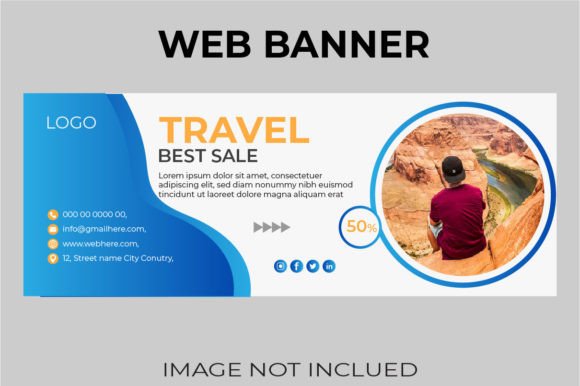
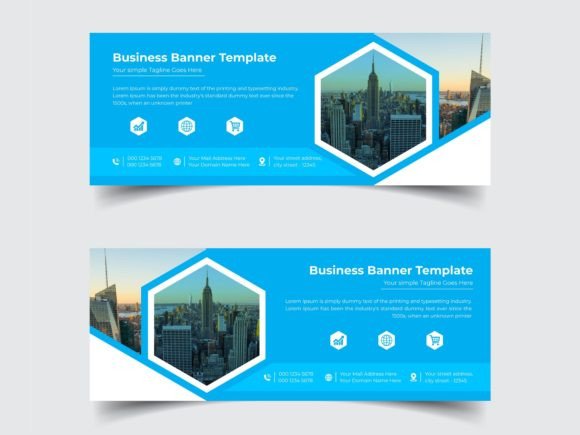
One of the most critical aspects of any digital asset is its technical fidelity. A common mistake among novice marketers is using low-resolution images that appear pixelated on high-definition screens. The Business Web Banner Template discussed here is engineered to prevent this issue. With dimensions of 1920 x 710 pixels, it covers the standard wide-screen formats used in modern web design. This aspect ratio is versatile, suitable for hero sections on landing pages, LinkedIn cover images, and large display ads.
The template operates in RGB Color mode, which is essential for any content destined for screens. Unlike CMYK, which is used for print, RGB ensures that colors appear vibrant and accurate on monitors, tablets, and smartphones. Additionally, the file is set at 300 DPI (dots per inch). While web displays typically render at 72 or 96 DPI, starting with a higher resolution provides flexibility. It allows you to crop, resize, or repurpose elements for higher-density displays (such as Retina screens) without losing clarity. This forward-thinking approach to resolution ensures your brand looks sharp across all devices.
File Formats and Compatibility
Versatility in file formats is crucial for seamless integration into various software ecosystems. The included files address this need by providing both Illustrator EPS CC and JPG formats. The EPS (Encapsulated PostScript) file is the powerhouse of this package. As a vector-based format, it allows for infinite scalability. You can edit text, shapes, and icons without any loss of quality. This is particularly important for logos and typography, which must remain crisp regardless of size adjustments.
For users who do not have access to Adobe Illustrator, the JPG files offer a immediate, albeit less flexible, solution. However, the true value lies in the editable nature of the EPS file. It is compatible with most major vector graphics editors, including CorelDRAW and Affinity Designer, making it accessible to a wide range of professionals. Note that while the template structure is fully editable, the photos shown in previews are not included. This is a standard practice that encourages you to use your own proprietary imagery, ensuring uniqueness and avoiding copyright issues associated with stock photography.
Integrating the Template into Your Creative Process
To maximize the utility of a business web banner template, it should be viewed as part of a larger content production pipeline. Here is how you can effectively incorporate it into your workflow:
- Preparation Phase: Before opening the template, gather all necessary assets. This includes your high-resolution logo, brand color codes (HEX or RGB values), and the specific copy you intend to use. Having these elements ready prevents disjointed editing sessions.
- Customization Phase: Open the EPS file in your preferred vector editor. Begin by replacing placeholder text with your actual headlines and subheadings. Pay attention to hierarchy; ensure the main message is the most prominent element. Next, swap out placeholder shapes or image frames with your own photography or illustrations.
- Brand Alignment: Adjust the color palette to match your brand guidelines. Since the template is fully editable, you can change background colors, button styles, and font colors to align with your corporate identity. Consistency here reinforces brand recognition.
- Export and Optimization: Once edits are complete, export the final design. For web use, consider saving a compressed JPG or PNG version to ensure fast loading times on your website. Keep the original EPS file archived for future modifications.
This structured approach ensures that the template does not become a constraint but rather a catalyst for efficient design. It allows for rapid deployment of campaigns while maintaining high visual standards.
Practical Tips for Effective Customization
While the template provides a solid foundation, the effectiveness of the final banner depends on how well it is customized. Here are some practical observations to enhance your results:
Maintain Visual Balance: The 1920 x 710 pixel canvas offers ample space, but clutter can dilute your message. Use negative space effectively to guide the viewer’s eye toward the call-to-action. Do not feel compelled to fill every corner of the banner.
Typography Matters: Stick to two or three fonts maximum. If the template uses a specific font pair, try to maintain that combination unless your brand guidelines dictate otherwise. Ensure that text contrast is high enough to be readable against the background image.
Image Selection: Since photos are not included, your choice of imagery will define the tone of the banner. Select high-quality images that resonate with your target audience. Avoid generic stock photos that lack authenticity. If possible, use original photography that reflects your actual products or team.
Consistency Across Channels: If you are running a multi-channel campaign, use this template as the master design. Adapt its elements for smaller formats (such as social media posts) by cropping and resizing key components. This ensures a cohesive visual experience for users moving between different platforms.
Long-Term Value and Asset Management
Investing in a high-quality Business Web Banner Template yields dividends beyond a single project. By establishing a reusable framework, you create a library of branded assets that can be deployed quickly for future initiatives. This is particularly valuable for businesses that run regular promotions, update their website seasonally, or frequently launch new services.
Proper organization of these files is key. Store the original EPS files in a cloud-based directory with clear naming conventions (e.g., Banner_Template_v1_Master.eps). This facilitates easy access for team members and ensures that everyone is working from the most recent version. Over time, you may develop variations of the template for different purposes—such as one for sales announcements and another for informational updates. This modular approach to design assets enhances operational efficiency and reduces dependency on external design agencies for minor updates.
In conclusion, a business web banner template is more than a graphical shortcut; it is a strategic tool for maintaining professional standards in digital communication. By understanding its technical specifications, integrating it into your workflow, and customizing it with care, you can produce high-impact visual content that drives engagement and supports your business goals. Thank you for choosing my store. I wish you a good day and success in your creative endeavors.