Evaluating the Professional Web Banner Design Template for Digital Marketing
In the fast-paced environment of digital marketing, visual consistency and speed are often the deciding factors between a campaign that resonates and one that gets lost in the noise. For professionals ranging from freelance graphic designers to small business owners managing their own branding, the pressure to produce high-quality assets quickly is constant. This is where a reliable Web Banner Design Template becomes more than just a convenience; it becomes a strategic asset. By leveraging pre-structured, professionally designed layouts, creators can bypass the initial, time-consuming phases of design and focus on customization and message delivery.
The specific template under discussion here offers a compelling blend of flexibility and professional polish. It is not merely a static image but a fully editable resource provided in high-resolution EPS format, ensuring that the final output meets rigorous print and digital standards. With features like smart objects for easy image replacement and organized layer systems, this tool addresses common pain points in graphic design workflows, such as version control and asset management.
Core Features and Technical Specifications
Understanding the technical backbone of any design asset is crucial before integrating it into a workflow. This Professional web banner Design Template is built with versatility in mind, catering to both digital display and high-quality print requirements. The file is delivered in EPS (Encapsulated PostScript) format, a vector-based standard that ensures scalability without loss of quality. This is particularly important for banners that may need to be resized for different platforms or printed for physical events.
- High Resolution: The template operates at 300 DPI (dots per inch), which is the industry standard for print-ready materials. While web banners typically display at 72 DPI, having a 300 DPI source file allows for crisp rendering on high-density screens and provides the option for offline promotional use.
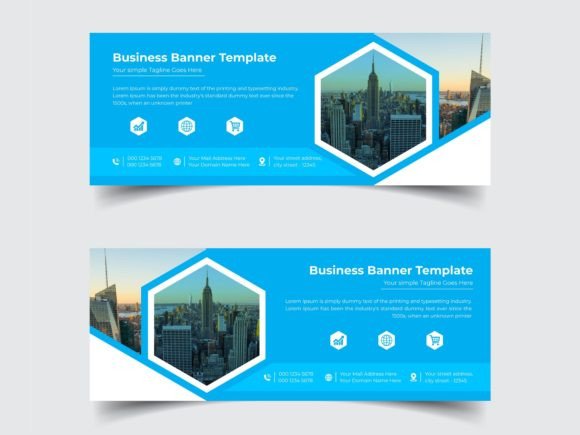
- Color Variations: It includes two distinct color variations. This dual-option approach allows brands to test different aesthetic directions or align the banner with secondary brand colors without starting from scratch.
- Smart Object Integration: One of the most significant usability features is the inclusion of smart objects for raster images. This allows users to swap out placeholder images with their own photography or graphics simply by double-clicking the layer, preserving all applied effects, masks, and transformations automatically.
- File Formats: The download package includes AI (Adobe Illustrator) and EPS formats, ensuring compatibility with industry-standard vector editing software.
- Dimensions and Bleed: The custom size is set to 500x500 pixels with a 0.25-inch bleed. This square format is increasingly popular for social media ads and display networks, while the bleed area ensures that no white edges appear if the banner is trimmed or printed.
Usability and Workflow Efficiency
The true value of a Web Banner Design Template lies in how it integrates into the daily workflow of a creator. For many marketers and entrepreneurs, time is a scarce resource. Spending hours constructing a layout from blank canvas to final export is often inefficient, especially when the goal is to test multiple ad variations or update seasonal promotions.
This template’s organized layer system is a standout feature for usability. In complex design files, poorly named or grouped layers can lead to frustration and errors. Here, the logical structure means that text, background elements, and image placeholders are clearly separated. This organization reduces the learning curve for new users and minimizes the risk of accidentally altering critical design elements. For freelancers who hand off files to clients, this level of organization also reflects professionalism and facilitates smoother collaboration.
Furthermore, the use of editable fonts enhances flexibility. Rather than being locked into proprietary typefaces that require additional purchases or licenses, the template utilizes free-to-use editable fonts. This removes a potential barrier to entry for small business owners or hobbyists who may not have extensive font libraries. It ensures that the text can be modified to suit specific messaging needs without worrying about licensing compliance or missing font errors when sharing the file.
Design Quality and Aesthetic Appeal
Aesthetically, the template is described as elegant, a term that in design usually implies clean lines, balanced composition, and thoughtful use of whitespace. An elegant design does not shout for attention; rather, it guides the viewer’s eye naturally toward the key message or call to action. This subtlety is often more effective in digital advertising, where users are bombarded with aggressive visuals.
The two color variations provided allow for A/B testing, a critical practice in digital marketing. By changing the color scheme, marketers can observe which variation drives higher click-through rates. For instance, a cooler tone might convey trust and professionalism, suitable for B2B services, while a warmer tone might evoke urgency or excitement, better suited for retail sales. Having these options pre-designed saves the effort of manually recoloring complex vector elements, ensuring that the visual harmony remains intact regardless of the chosen palette.
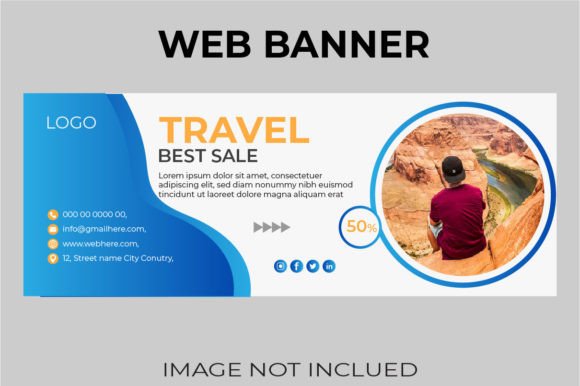
It is important to note that the images shown in previews are not included in the download. This is a standard practice in template distribution to protect copyright. However, it places the responsibility on the user to source high-quality imagery that complements the template’s elegant style. The smart object feature makes this process seamless, but the final impact will heavily depend on the quality of the user-supplied photos. Low-resolution or poorly lit images will detract from the professional look of the banner, regardless of how well-designed the template itself is.
Target Audience and Practical Applications
Who benefits most from this Professional web banner Design Template? The answer spans a wide demographic of digital creators and business operators.
- Small Business Owners and Entrepreneurs: For those managing their own marketing without a dedicated design team, this template offers a way to maintain a professional brand image without hiring expensive agencies. The ease of editing text and images allows for quick updates to promotions or announcements.
- Freelance Designers and Agencies: Professionals can use this template as a starting point for client projects, significantly reducing billable hours spent on initial concepts. It serves as a robust base that can be customized to fit specific brand guidelines, allowing designers to focus on strategic adjustments rather than foundational layout work.
- Social Media Managers and Content Creators: The 500x500 px dimensions are ideal for Instagram posts, Facebook ads, and other square-format social media placements. The ability to quickly swap images and text makes it perfect for maintaining a consistent visual identity across multiple posts.
- Educators and Publishers: Those creating promotional materials for courses, webinars, or digital products can benefit from the clean, readable layout. The emphasis on typography and clear hierarchy ensures that important information, such as dates and titles, stands out.
Limitations and Considerations
While the template offers significant advantages, it is essential to approach it with realistic expectations. First, it requires Adobe Illustrator or compatible vector software to edit. Users relying solely on raster-based programs like Photoshop may find the EPS format less intuitive, although Photoshop can open EPS files, editing vector paths is limited. Therefore, a basic understanding of vector graphics is beneficial.
Second, the fixed size of 500x500 pixels may not suit all advertising networks. While square formats are versatile, some platforms require landscape or portrait orientations. Users may need to adjust the artboard size and rearrange elements if they need different aspect ratios, which could require additional design skills beyond simple text and image swapping.
Finally, the "elegance" of the design is subjective. What appears elegant to one audience may seem too minimal or understated to another. It is crucial for users to evaluate whether the template’s aesthetic aligns with their brand voice. For brands that rely on bold, chaotic, or highly illustrative styles, this template might require significant modification to fit their identity.
Final Thoughts on Value and Implementation
In conclusion, this Web Banner Design Template represents a practical solution for anyone looking to streamline their digital asset creation process. Its strengths lie in its technical robustness—300 DPI resolution, vector scalability, and smart object functionality—and its user-friendly structure. By providing an organized, editable foundation, it empowers users to produce professional-grade banners efficiently.
For those willing to invest a small amount of time in learning the file structure and sourcing appropriate imagery, the long-term value is substantial. It promotes consistency, reduces production time, and supports effective marketing practices like A/B testing through its color variations. Whether you are a seasoned designer looking to optimize your workflow or a business owner aiming to elevate your visual presence, this template offers a reliable, high-quality starting point for your next campaign.