Online Privacy Icon Set: Visual Clarity for the Modern Web
In an era where data breaches and digital surveillance are daily headlines, the concept of privacy has shifted from a technical backend concern to a front-end user experience priority. Users no longer just read privacy policies; they scan interfaces for visual cues that signal safety, transparency, and control. This is where a high-quality Online Privacy Icon Set becomes an indispensable asset for web developers, UI designers, and brand strategists. These small graphical elements do more than decorate a page; they serve as universal shorthand for trust.
The demand for clear, recognizable symbols representing security, anonymity, and data protection has surged alongside the implementation of regulations like GDPR and CCPA. As businesses strive to demonstrate compliance and ethical data handling, the visual language of privacy must be both aesthetically pleasing and instantly understandable. A well-curated collection of icons allows creators to communicate complex legal and technical concepts through simple, intuitive graphics.
The Evolution of Trust in Digital Interfaces
Historically, online security was represented by generic padlocks or shield images that often looked outdated or intimidating. Today, the approach is far more nuanced. Modern web design favors minimalism and clarity. Users are skeptical of overly aggressive security badges that resemble spammy advertisements. Instead, they respond to clean, integrated design elements that suggest privacy is a core feature of the product, not an afterthought.
This shift reflects a broader change in user expectations. People are more digitally literate than ever before. They understand what cookies are, they know when their location is being tracked, and they expect granular control over their personal information. Consequently, the icons used to represent these functions must evolve. A static, pixelated image no longer suffices. Designers need versatile vector graphics that can adapt to dark modes, responsive layouts, and various brand color schemes without losing integrity.
The relevance of a dedicated Online Privacy icon set lies in its ability to standardize this visual language. When a user sees a consistent symbol for "data deletion" or "anonymous browsing" across different platforms, it reduces cognitive load. It creates a sense of familiarity and reliability. For businesses, using professional, cohesive icons signals attention to detail and respect for the user’s digital rights.
Versatility Through Multiple Design Styles
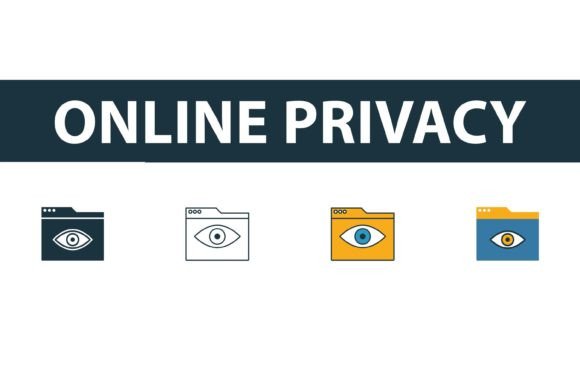
One of the most significant challenges in web development is maintaining visual consistency across diverse interface components. A single style rarely fits every context. This is why a comprehensive icon collection offers four distinct styles: filled, outline, colored, and flat. Each style serves a specific functional and aesthetic purpose within a modern website or application.
- Filled Icons: These are bold and high-contrast, making them ideal for primary calls-to-action or active states. When a user toggles a privacy setting to "on," a filled icon provides immediate visual confirmation.
- Outline Icons: Perfect for navigation bars and secondary menus, outline icons are lightweight and unobtrusive. They maintain a clean look that doesn’t compete with content, suitable for interfaces that prioritize minimalism.
- Colored Icons: Adding strategic color draws attention to critical information. A colored shield or eye symbol can highlight important privacy notices or warnings, guiding the user’s eye to essential details without relying solely on text.
- Flat Symbols: These offer a balanced middle ground, providing shape and presence without the heaviness of filled icons or the delicacy of outlines. They are excellent for illustrative purposes, such as explaining data flow in an onboarding tutorial.
Having access to all four styles within a single Online Privacy Icon Set ensures that designers can maintain brand consistency while adapting to different UI needs. It eliminates the hassle of sourcing mismatched graphics from multiple libraries, which often results in a disjointed user experience.
Technical Flexibility for Developers and Creators
For web developers and graphic designers, the format of asset files is just as important as the design itself. The modern workflow requires assets that are scalable, editable, and compatible with various software ecosystems. A professional icon pack addresses this by providing files in EPS, JPG, AI, and SVG formats.
SVG (Scalable Vector Graphics) is arguably the most crucial format for web development. SVGs are resolution-independent, meaning they look crisp on any screen size, from mobile phones to 4K monitors. They are also code-based, allowing developers to manipulate colors, sizes, and animations directly via CSS or JavaScript. This capability is vital for creating interactive privacy dashboards where icons might change state based on user input.
AI (Adobe Illustrator) and EPS (Encapsulated PostScript) files are essential for designers who need to modify the underlying vectors. Whether it is adjusting the stroke width to match a specific brand guideline or combining elements to create a custom logo, having the source files ensures complete creative control. These formats allow for precise editing without quality loss, a necessity for professional print materials or high-resolution displays.
While vector formats dominate digital design, JPG files remain useful for quick previews, email newsletters, or platforms that do not support vector uploads. Including JPGs in the package ensures that non-designers, such as marketing managers or content creators, can easily incorporate privacy symbols into their campaigns without needing specialized software.
Practical Applications in Modern Workflows
The utility of creative online privacy icons extends beyond simple decoration. They play a functional role in enhancing usability and compliance. Consider a SaaS platform that handles sensitive customer data. Using a clear, recognizable icon for "End-to-End Encryption" on the login page can significantly reduce user anxiety. Similarly, an e-commerce site can use friendly, approachable icons to explain how customer data is used for personalization, turning a potential privacy concern into a value proposition.
Educators and bloggers also benefit from these resources. When writing about digital literacy or cybersecurity, incorporating high-quality visuals helps break down complex topics. A flat symbol representing a "cookie tracker" can make an article more engaging and easier to understand than text alone. For freelancers and agencies, having a ready-to-use library of privacy icons speeds up the design process, allowing for faster prototyping and client presentations.
Moreover, as remote work and digital collaboration become standard, the need for clear visual communication in internal tools grows. HR platforms, project management software, and communication apps all handle personal data. Using consistent privacy icons in these interfaces helps employees understand their rights and the company’s data practices, fostering a culture of security awareness.
Choosing the Right Assets for Your Brand
When selecting an Online Privacy Icon Set, it is important to consider how the symbols align with your brand’s voice. A fintech startup might prefer sleek, outline icons that convey precision and modernity. In contrast, a consumer-focused health app might opt for softer, colored icons that feel welcoming and reassuring. The key is consistency. Mixing styles can confuse users and dilute the professional appearance of your product.
Easy editing is another critical factor. Look for collections where layers are organized and paths are clean. This saves time during customization and ensures that the final output is optimized for performance. Bloated or poorly constructed vector files can slow down website loading times, negatively impacting SEO and user experience. High-quality SVGs should be lightweight and efficient.
Ultimately, investing in a professional icon set is an investment in user trust. In a digital landscape fraught with uncertainty, clear visual signals of privacy and security can be the differentiator that convinces a user to sign up, make a purchase, or share their information. By integrating well-designed, versatile privacy icons into your digital presence, you communicate respect for your audience’s data and a commitment to transparent practices.
As technology continues to advance and privacy regulations become more stringent, the importance of visual clarity will only grow. Designers and developers who prioritize high-quality, adaptable graphics will be better equipped to meet these challenges. An Online Privacy Icon Set is not just a collection of images; it is a toolkit for building trust in the digital age.