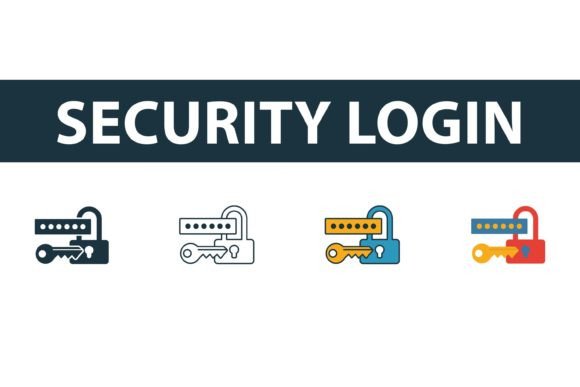
Security Login Icon Set: 4 Styles for Modern UI
In the fast-paced world of web development, first impressions are often formed in milliseconds. When a user lands on a login page, they aren’t just looking for input fields; they are subconsciously scanning for cues of trust, security, and professionalism. This is where a high-quality Security Login Icon Set becomes an indispensable asset for designers and developers alike. It is not merely about decoration; it is about communication. A well-chosen icon can guide the eye, clarify function, and reinforce brand identity without saying a word.
For professionals ranging from freelance coders to enterprise marketing teams, having access to versatile graphical elements is crucial. The Security Login Icon Set offers exactly that versatility by providing four distinct visual styles: filled, outline, colored, and flat. This diversity ensures that whether you are building a minimalist fintech app or a vibrant educational platform, you have the right symbolic language to match your interface.
The Power of Visual Consistency in Authentication
Authentication flows are often the most friction-heavy part of a user’s journey. Users are cautious here. They are entering sensitive data, and any visual ambiguity can increase anxiety or cause hesitation. By integrating a cohesive Security Login icon set, you reduce cognitive load. The brain processes images significantly faster than text. When a user sees a recognizable lock symbol or a shield icon, they instantly understand the context: this is a secure area.
However, consistency is key. If your login button uses an outline style but your dashboard uses filled icons, the disjointed experience can make the application feel unfinished or unpolished. This collection solves that problem by offering multiple styles within the same design family. You can choose the outline version for a clean, airy header and switch to the filled version for active states or primary calls to action, maintaining visual harmony throughout the user experience.
Exploring the Four Distinct Styles
One of the standout features of this collection is the variety. Let’s break down how each style serves a different purpose in web and app design:
- Filled Icons: These are bold and high-contrast. They work exceptionally well for primary buttons or when you need an icon to stand out against a light background. They convey solidity and importance, making them ideal for the final "Submit" or "Login" action.
- Outline Icons: Perfect for modern, minimalist interfaces. Outline symbols feel lighter and less intrusive. They are excellent for secondary actions, such as "Forgot Password" links or helper text, where you want to provide guidance without overwhelming the user.
- Colored Icons: Sometimes, monochrome isn’t enough. Colored variants add a layer of emotional resonance. A blue shield suggests trust and corporate stability, while a green lock might imply safety and go-ahead status. These are great for branding-heavy projects where color psychology plays a significant role.
- Flat Symbols: Bridging the gap between outline and filled, flat icons offer a contemporary look that is widely popular in mobile app design. They are simple, scalable, and retain clarity even at smaller sizes.
Technical Flexibility for Developers
For the technical side of your team, the file formats included in the Security Login Icon Set are designed for seamless integration into any workflow. You will receive EPS, JPG, AI, and SVG files. Each format serves a specific purpose in the development lifecycle.
The SVG (Scalable Vector Graphics) file is arguably the most valuable for modern web development. SVGs are code-based, meaning they remain crisp at any resolution, from a tiny mobile screen to a 4K monitor. They are also lightweight, contributing to faster page load times—a critical factor for SEO and user retention. Furthermore, SVGs can be styled directly with CSS, allowing developers to change colors or add hover effects dynamically without needing to edit the image file itself.
For those working in traditional design software like Adobe Illustrator, the AI and EPS files provide full editability. You can tweak anchor points, adjust stroke widths, or modify shapes to perfectly align with your brand guidelines. Meanwhile, the JPG files offer quick-and-dirty solutions for mockups, presentations, or email signatures where vector editing isn’t necessary.
Real-World Applications Across Industries
The utility of a Security Login icon set extends far beyond simple website login pages. Consider the following scenarios where these assets add tangible value:
E-Commerce Platforms: Trust is the currency of online retail. Using a professional, filled lock icon next to your checkout or account creation forms can subtly reassure customers that their payment information is safe. This small visual cue can directly impact conversion rates.
Corporate Intranets: Large organizations often have complex internal systems. Using a consistent set of outline icons for navigation menus helps employees navigate HR portals, payroll systems, and project management tools with ease. The clean aesthetic reduces visual clutter in data-heavy environments.
Educational Apps: For platforms serving students and teachers, colored icons can make the interface more engaging and friendly. A bright, flat shield icon can gamify the security aspect, making privacy settings feel approachable rather than intimidating.
SaaS Dashboards: Software-as-a-Service products rely heavily on user retention. A polished UI contributes to perceived product quality. By using the flat symbols from this collection, SaaS founders can ensure their authentication flows look as premium as their core features.
Enhancing Brand Identity and User Engagement
Your choice of icons is an extension of your brand voice. Are you serious and authoritative? The filled and outline styles in black or dark gray convey professionalism. Are you innovative and playful? The colored and flat options allow for creativity. By selecting the right style from the Security Login Icon Set, you align your functional elements with your overall brand narrative.
Moreover, these icons improve accessibility. When paired with proper ARIA labels and alt text, they help screen readers identify interactive elements. This commitment to inclusive design not only broadens your audience but also reflects positively on your company’s values.
Making the Right Choice for Your Project
When evaluating which style to implement, consider the density of your interface. If your design is already heavy with text and data, opt for the simplicity of outline icons to maintain breathing room. If your design is sparse, filled icons can add necessary weight and focus. Always test your chosen icons across different devices. What looks clear on a desktop monitor might become indistinct on a smartphone if the stroke width is too thin.
Remember, the goal is not just to have an icon, but to have the right icon. The Security Login Icon Set provides the flexibility to experiment and refine until the visual language feels intuitive. With easy-to-edit vector graphics, you are not locked into a rigid design. You have the freedom to adapt, scale, and customize as your project evolves.
In conclusion, investing in high-quality UI elements like this icon set is a small step with significant returns. It enhances usability, strengthens branding, and ultimately creates a smoother, more trustworthy experience for your users. Whether you are a solo developer launching a side project or a design lead overseeing a major platform update, these versatile symbols are ready to elevate your digital presence.