Server Icon Set: A Comprehensive Evaluation for Web Designers
In the realm of digital interface design, visual consistency is paramount. Whether you are building a dashboard for a cloud hosting provider, designing a mobile application for system administrators, or creating marketing materials for an IT consultancy, the quality of your graphical assets directly influences user perception. The Server Icon Set represents a curated collection of vector graphics designed to meet these specific needs. This article evaluates the utility, versatility, and practical applications of this icon collection, helping designers and developers determine if it aligns with their project requirements.
Understanding the Server Icon Set
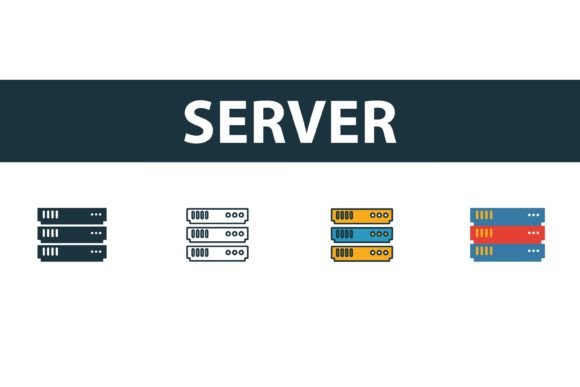
The Server Icon Set is not merely a single image but a comprehensive library of symbols representing server hardware, data centers, and web hosting concepts. At its core, this collection provides four distinct stylistic variations for each icon: filled, outline, colored, and flat. This diversity allows designers to maintain visual harmony across different sections of a website or application without needing to source icons from multiple disparate libraries.
Each symbol is crafted as a vector graphic, ensuring scalability without loss of quality. This is crucial for modern responsive design, where icons must look crisp on high-resolution retina displays as well as standard screens. The inclusion of a server icon set in your design toolkit simplifies the workflow by providing ready-to-use assets that adhere to professional standards of alignment, stroke weight, and visual balance.
Versatility Through Multiple Styles
One of the primary reasons designers evaluate this collection is its stylistic flexibility. Different design contexts demand different visual treatments. The four included styles address these varying needs effectively:
- Filled Icons: These are ideal for active states in user interfaces, such as selected tabs or buttons. The solid presence of filled icons draws attention and indicates interaction.
- Outline Icons: Often used for inactive states or minimalist designs, outline icons offer a lighter visual weight. They are perfect for clean, modern interfaces where whitespace is a key design element.
- Colored Icons: For marketing materials, presentations, or dashboards that require immediate visual categorization, colored icons add vibrancy and help distinguish between different types of servers or services.
- Flat Symbols: Flat design remains a staple in contemporary UI/UX. These symbols provide a balanced middle ground, offering clarity without the complexity of three-dimensional rendering.
By having access to all four styles within a single Server Icon Set, designers can ensure consistency. Switching between a dark mode and light mode, or between a detailed landing page and a sparse admin panel, becomes seamless when the underlying iconography shares the same geometric foundation.
Technical Specifications and File Formats
For professional workflows, the format of the asset is just as important as its appearance. This collection addresses technical needs by providing files in EPS, JPG, AI, and SVG formats. Understanding the role of each format helps in deciding how best to integrate these icons into your projects.
SVG (Scalable Vector Graphics) is arguably the most valuable format for web development. SVGs are code-based, meaning they can be styled with CSS, animated with JavaScript, and scaled infinitely without pixelation. For developers building responsive websites, SVGs from a server icon set reduce load times and improve accessibility when properly tagged.
AI (Adobe Illustrator) and EPS (Encapsulated PostScript) files are essential for designers who need to edit the source vectors. If a project requires a slight modification to the server rack’s perspective or a change in the color palette to match specific brand guidelines, having the editable AI file is indispensable. These formats allow for precise manipulation of anchor points and paths.
JPG (Joint Photographic Experts Group) files serve a different purpose. While not scalable, they are useful for quick previews, email signatures, or documents where vector support is limited. However, for high-quality digital products, reliance on JPGs should be minimized in favor of vector formats.
Benefits and Practical Considerations
Adopting a pre-made Server Icon Set offers significant time savings. Creating custom icons from scratch requires specialized skills in vector illustration and a deep understanding of visual semiotics. By utilizing a professional collection, teams can bypass the initial design phase and focus on implementation and user experience testing.
Furthermore, consistency is a major benefit. When icons are drawn by different designers or sourced from various free repositories, inconsistencies in stroke width, corner radius, and perspective often occur. These subtle discrepancies can make a product feel unpolished. A unified set ensures that every server, database, and network symbol shares the same visual language.
However, there are tradeoffs to consider. While the set is "easy to edit," significant customization still requires proficiency in vector editing software. Users without experience in Adobe Illustrator or similar tools may find themselves limited to using the icons as-is. Additionally, while the collection covers standard server representations, highly specific or proprietary hardware configurations may not be represented, requiring supplementary custom design work.
When to Use This Icon Set
This collection is a strong fit for several specific scenarios:
- Web Hosting Dashboards: Control panels require clear, recognizable symbols for actions like restarting servers, managing databases, and monitoring bandwidth. The outline and filled styles are particularly effective here for indicating state changes.
- IT Service Marketing: Consultancies and managed service providers often need visuals for brochures, slide decks, and websites. The colored and flat styles provide the visual appeal necessary for engaging potential clients.
- Mobile Applications: Apps related to system monitoring or cloud management benefit from the scalability of SVGs and the clarity of flat symbols, ensuring usability on small screens.
When to Consider Alternatives
While the Server Icon Set is robust, it may not be the ideal solution for every project. If your brand identity relies heavily on unique, hand-drawn illustrations or a highly unconventional artistic style, a standardized icon set might feel too generic. In such cases, commissioning bespoke iconography may be necessary to maintain brand distinctiveness.
Additionally, if your project requires icons for extremely niche technical concepts not covered in standard web hosting imagery, you may need to supplement this set with custom-designed assets. It is also worth noting that if you are working exclusively in a non-vector environment, such as certain legacy content management systems, the benefits of SVG and AI files may not be fully realized, though the JPGs would still be usable.
Making the Decision
Evaluating whether to integrate this Server Icon Set into your workflow depends on your project’s scope and design maturity. If you prioritize efficiency, consistency, and technical flexibility, this collection offers a compelling value proposition. The availability of multiple styles and formats ensures that the icons can adapt to various stages of the design and development process.
For teams looking to streamline their asset pipeline without sacrificing quality, this set provides a reliable foundation. It eliminates the ambiguity of sourcing individual icons and ensures that your visual communication regarding server infrastructure remains professional and coherent. By weighing the benefits of time savings and consistency against the need for potential customization, you can determine if this icon collection aligns with your strategic design goals.