Server Rental Icon Set: Practical Visuals for Hosting and Tech Projects
Visual communication moves faster than text, especially in the tech industry. When you are explaining complex infrastructure or selling digital services, your audience needs to grasp the concept instantly. This is where a well-curated Server Rental Icon Set becomes an indispensable asset. It is not just about decoration; it is about clarity. Whether you are a freelancer building a client’s website, a marketer designing a pitch deck, or a developer documenting an API, having the right symbols can bridge the gap between technical jargon and user understanding.
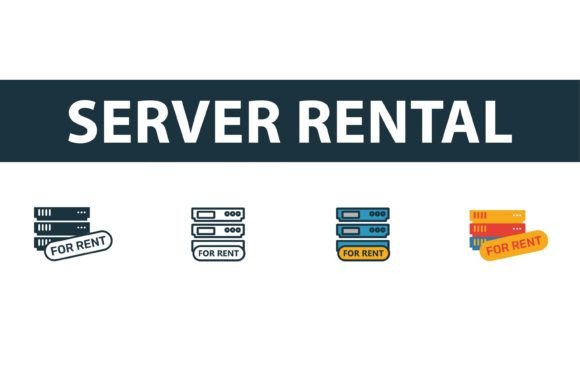
This collection offers four distinct styles—filled, outline, colored, and flat—giving you the flexibility to match any brand identity. Instead of wasting hours drawing vectors from scratch or settling for low-quality clip art, you get professional-grade graphics that are easy to edit and ready to deploy. Let’s explore how these icons fit into real-world workflows and why they matter for your next project.
Why Specific Icons Matter in Web Hosting Contexts
Generic computer icons do not cut it when you are discussing server infrastructure. A laptop symbol suggests personal use, while a server rack implies power, storage, and reliability. The Server Rental icon set is designed specifically to convey these nuances. When users see a dedicated server icon, they immediately associate it with performance and security, which is crucial for businesses offering hosting solutions.
Consider the psychological impact. If you are launching a landing page for a new cloud hosting service, using vague imagery can make your offer feel uncertain. Precise vector graphics signal professionalism. They tell your visitors that you pay attention to details. This subtle cue builds trust, which is the currency of the digital economy. By using symbols that accurately represent server rental concepts, you align your visual language with your value proposition.
Versatility Across Different Design Styles
One of the biggest challenges in design is consistency. You might love the look of minimalist line art for your mobile app, but your corporate brochure requires bold, solid shapes. This icon collection solves that problem by providing four variations of each symbol. Here is how each style serves a different purpose:
- Filled Icons: These are perfect for high-contrast interfaces or when you need an icon to stand out as a primary navigation element. They carry visual weight and are easily recognizable even at smaller sizes.
- Outline Icons: Ideal for modern, clean designs. They feel lightweight and unobtrusive, making them excellent for secondary menus or feature lists where you do not want to overwhelm the user.
- Colored Icons: Use these when you need to draw immediate attention or categorize information. Color coding helps users differentiate between various server types or service tiers quickly.
- Flat Symbols: These strike a balance between detail and simplicity. They work well in presentations and infographics where you need a friendly, approachable aesthetic without sacrificing clarity.
Having all four options in one package means you do not have to switch between different designers or libraries. You maintain a cohesive look across all your materials, from your website favicon to your printed annual report.
Real-World Use Cases for Creators and Businesses
So, who actually needs these icons? The answer is broader than you might think. Let’s look at specific scenarios where this Server Rental Icon Set adds tangible value.
For Web Developers and UI Designers
If you are building a dashboard for a hosting provider, you need intuitive navigation. Users should be able to identify their "Virtual Private Server" or "Dedicated Hosting" section at a glance. Using standardized, high-quality SVG files ensures that your icons look crisp on retina displays and scale perfectly across devices. You can easily change the stroke width or color via CSS if you are using the outline versions, giving you full control over the interactive states.
For Digital Marketers and Content Creators
Blog posts and social media graphics thrive on visual breaks. Long blocks of text about server uptime or data migration can be daunting. Inserting relevant icons breaks up the content, making it more digestible. For instance, when writing a comparison article about shared hosting versus dedicated servers, using distinct icons for each type helps readers visualize the differences. It keeps them engaged and reduces bounce rates.
For Educators and Technical Writers
Explaining network topology or cloud architecture to students or clients can be difficult. Diagrams cluttered with text are hard to follow. Replacing text labels with clear server symbols simplifies the learning process. Whether you are creating a PowerPoint presentation for a workshop or a PDF guide for new employees, these vector graphics help illustrate complex systems without overwhelming the audience.
For Entrepreneurs and Startups
When pitching to investors, your deck needs to look polished. Amateur graphics can undermine your credibility. Using professional logo vector graphics from a trusted collection shows that you take your brand seriously. You can use these icons to represent your tech stack, your infrastructure partners, or your service offerings, making your business model easier to understand in a short amount of time.
Technical Benefits: EPS, AI, JPG, and SVG Formats
The utility of an icon set is largely determined by its file formats. This collection includes EPS, AI, JPG, and SVG files, covering every possible use case. Understanding why this matters can save you significant time and frustration.
SVG (Scalable Vector Graphics) is the gold standard for web use. These files are code-based, meaning they load quickly and remain sharp at any size. You can embed them directly into your HTML, allowing for easy styling and animation. For developers, this is a huge time-saver.
AI and EPS files are essential for designers. If you need to modify the shape of a server rack or combine elements to create a custom logo, these editable vector formats allow you to do so in Adobe Illustrator or similar software. You are not stuck with a static image; you have full creative control.
JPG files are useful for quick previews or for platforms that do not support vector formats. While they are not scalable, they are universally compatible and easy to share in emails or chat applications.
What to Consider Before Downloading
Before you integrate any new assets into your workflow, consider your long-term needs. Are you looking for a one-time solution, or do you need a library that can grow with your brand? The Server Rental icon set is designed for flexibility, but you should still plan how you will implement it.
First, think about consistency. If you already have an established design system, check if these icons complement your existing palette and typography. The ability to edit colors and strokes makes integration easier, but you should still ensure the style aligns with your brand voice.
Second, consider accessibility. When using icons, always include alt text or aria-labels for screen readers. An icon alone may not convey enough information for users with visual impairments. Pairing these visuals with clear, concise text ensures that your content is inclusive and usable for everyone.
Finally, evaluate the license terms. Ensure that the usage rights fit your project, whether it is a personal blog, a commercial product, or a client deliverable. Having the right permissions prevents legal headaches down the road.
Making the Most of Your Visual Assets
Investing in quality graphics is an investment in your communication efficiency. The Server Rental Icon Set is more than just a download; it is a toolkit for better storytelling. By choosing the right style for the right context, you enhance user experience, strengthen your brand identity, and convey complex ideas with ease.
Whether you are tweaking a landing page, designing a comprehensive guide, or pitching a new tech venture, these icons provide the visual shorthand your audience needs. They are easy to edit, versatile in application, and professional in appearance. In a digital world where attention is scarce, clear visuals are not just nice to have—they are essential. Choose tools that empower you to create clearly, efficiently, and effectively.