Linear Tech & Multimedia Icons
In the fast-paced world of digital design, clarity is king. Whether you are building a mobile application for a startup, refreshing a corporate website, or designing marketing materials for a tech conference, the visual language you choose speaks volumes before a single word is read. This is where the Linear Technology and Multimedia Icons Set becomes an indispensable asset for modern creators. Unlike bulky, filled illustrations that can clutter a user interface, linear icons offer a sleek, minimalist approach that prioritizes function without sacrificing aesthetic appeal.
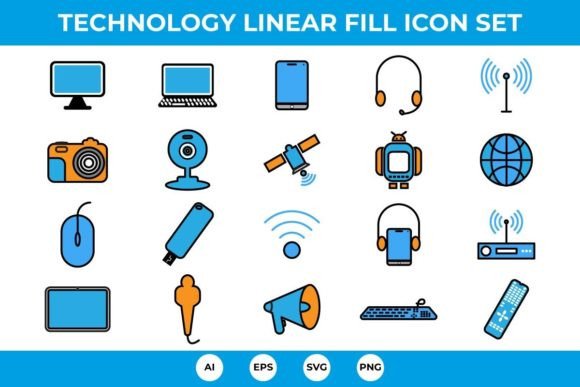
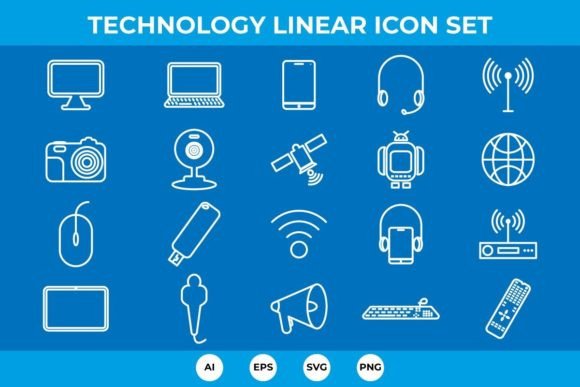
This collection is not just a random assortment of graphics; it is a curated toolkit designed specifically for the needs of contemporary web design and app development. The set includes 20 unique, high-quality icons that cover the essential hardware and connectivity concepts we interact with daily. From the ubiquitous Desktop Computer and Laptop to more specific tools like the Webcam icon and Router icon, every element has been crafted with precision. The beauty of this set lies in its versatility. It serves as a foundational piece of brand identity for tech-focused companies, ensuring that their visual communication remains clean, professional, and easily understandable across various devices and screen sizes.
The Aesthetic Appeal of Linear Design
The visual personality of the Linear Technology and Multimedia Icons Set is defined by its restraint and elegance. In an era where users are bombarded with information, linear icons act as visual breathers. They use thin, consistent strokes to outline forms, creating a sense of lightness and sophistication. This style aligns perfectly with modern UI/UX trends that favor whitespace and intuitive navigation. When you look at the Mobile Phone or Tablet icons in this set, you notice the absence of unnecessary detail. There are no shadows, gradients, or complex textures. Instead, you get pure geometry that communicates the object’s function instantly.
This minimalist approach offers significant advantages for logo design and social media graphics. Because the icons are vector-based, they scale infinitely without losing quality. This means the same Headphones icon can look crisp on a business card and equally sharp on a massive billboard. The linear style also makes these icons incredibly easy to integrate into existing design systems. If your brand uses a specific color palette, you can easily change the stroke color of these icons to match your brand identity seamlessly. This flexibility is crucial for maintaining consistency across different platforms, from iOS and Android apps to responsive websites.
Furthermore, the set includes culturally relevant symbols like the Android robot and the World icon, which help bridge the gap between global audiences and local users. The Broadcast and Announcement icons are particularly useful for news outlets, streaming services, or communication apps, providing clear visual cues for action buttons. By using a cohesive set like this, designers avoid the disjointed look that comes from mixing icons from different sources, thereby enhancing the overall professionalism of the project.
Versatility Across Digital and Print Media
While these icons are optimized for digital screens, their utility extends far beyond pixels. The Linear Technology and Multimedia Icons Set is provided in four versatile formats: AI, EPS, SVG, and PNG. This comprehensive file selection ensures that whether you are a developer coding a React component or a print designer laying out a brochure, you have the right tool for the job. The SVG and PNG files are ready to drop directly into web projects, offering lightweight assets that improve page load speeds—a critical factor for SEO and user retention.
For print applications, such as packaging design or editorial layouts, the AI and EPS files allow for full editability. Imagine designing a manual for a new smart home device. You can use the Wireless icon, Remote, and Keyboard icon to create intuitive instructional diagrams. The clean lines ensure that even when printed in small sizes, the icons remain legible. This readability is paramount in editorial design, where space is often limited, and clarity cannot be compromised.
Marketers and content creators will also find immense value in this set. When creating infographics or presentation decks, having a unified icon set helps maintain visual hierarchy. For instance, using the Microphone and Camera icons to highlight features in a product launch presentation creates a cohesive narrative. The Flash Drive and Mouse icon can be used to represent data storage and user interaction in technical documentation. Because the icons are vector ready, you can resize them to fit any layout constraint without worrying about pixelation or blurriness.
The inclusion of composite icons, such as the Headphone and Mobile phone combination, adds another layer of convenience. These pre-combined elements save designers time and ensure that common pairings are visually balanced. This attention to detail reflects a deep understanding of how technology is used in real life, making the icons feel natural and intuitive to the end-user.
Practical Implementation and Best Practices
Integrating the Linear Technology and Multimedia Icons Set into your workflow is straightforward, but keeping a few best practices in mind will maximize their impact. First, consider the context of use. Linear icons work best when there is sufficient contrast between the icon and the background. If you are placing these icons on a dark background, ensure the stroke weight is appropriate so they don’t disappear. Conversely, on light backgrounds, you might want to increase the stroke thickness slightly for better visibility.
Consistency is key. When using these icons, avoid mixing them with filled or colorful icons unless you have a specific design reason. The strength of this set lies in its uniformity. Use the Satellite and Router icon together in a network diagram to maintain a consistent visual language. If you need to emphasize a particular action, consider changing the color of the active icon while keeping the others neutral. This technique guides the user’s eye and improves the usability of your interface.
For developers, the SVG format is your best friend. SVGs are code-based, meaning you can manipulate them with CSS. You can add hover effects, animations, or state changes easily. For example, you could animate the signal waves on the Wireless icon to indicate connectivity status. This level of interactivity enhances user engagement and makes the digital experience more dynamic.
Finally, always review the licensing terms. This set is designed for both personal and commercial use, making it a safe choice for client projects, freelance work, and internal business tools. Whether you are a solo entrepreneur building a portfolio site or a large agency designing a complex enterprise platform, the Linear Technology and Multimedia Icons Set provides the reliability and quality needed to elevate your design standards. By choosing high-quality, versatile assets like these, you invest in the long-term success and professionalism of your visual communication.